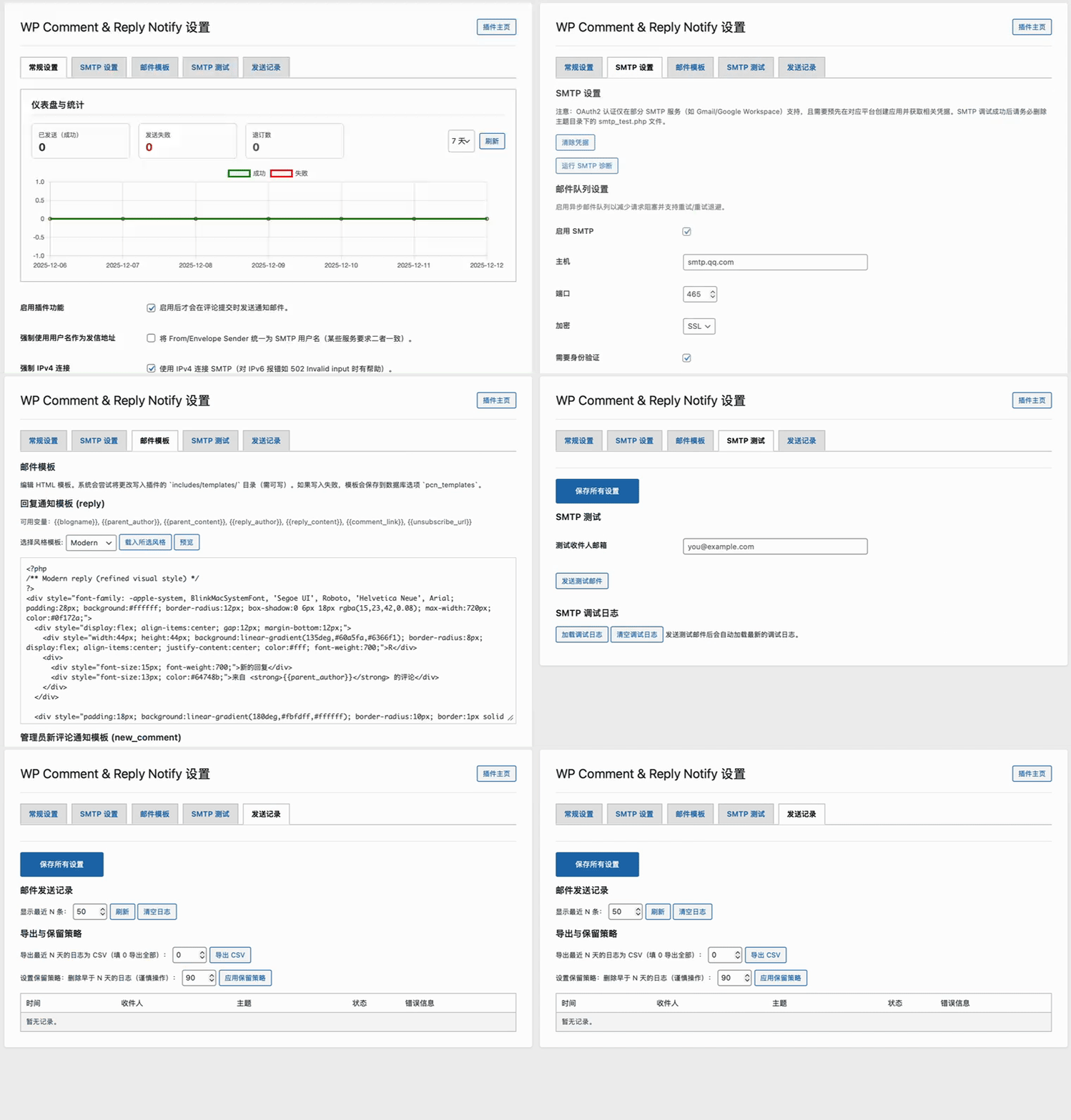
这是一个简单但功能强大的 WordPress 插件,旨在增强和自定义评论通知邮件。它通过提供可靠的 SMTP 发信、可编辑的 HTML 模板和详细的调试工具,弥补了 WordPress 默认邮件功能的不足。
主要特性
-
SMTP 可靠发信:
- 支持通过外部 SMTP 服务器(如 QQ 邮箱、Gmail、企业邮箱等)发送所有评论通知邮件。
- 可自定义配置 SMTP 主机、端口、加密方式(无、SSL、TLS)。
- 支持 SMTP 身份验证(用户名/密码)。
-
灵活的发件人设置:
- 可将 SMTP 登录用户名与邮件的“发件人地址 (From)”和“发件人名称 (From Name)”分离开。
- 可选强制将发件人地址(From)和信封发件人(Envelope Sender)统一设置为 SMTP 用户名,以提高邮件送达率。
-
可编辑的 HTML 模板:
- 为“新回复通知”、“管理员新评论通知”和“待审核评论通知”提供了独立的 HTML 邮件模板。
- 可直接在后台设置页面编辑模板内容,支持 HTML。
-
强大的后台管理:
- 总开关: 一键启用或禁用整个插件的邮件通知功能。
- 发信测试: 配置好 SMTP 后,可向指定邮箱发送一封测试邮件,快速验证设置是否正确。
- 调试日志:
- 实时记录详细的 SMTP 会话日志(客户端与服务器的完整通信过程)。
- 可在后台查看最近 N 条调试日志,便于快速定位问题(如
535 Login fail等认证失败错误)。 - 支持一键清空日志。
-
高级兼容性选项:
- 登录机制: 可在“自动协商”、“LOGIN”、“PLAIN”之间选择 SMTP 认证机制,以兼容不同服务商的要求。
- 强制 IPv4 连接: 当服务器环境存在 IPv6 连接问题时,可强制使用 IPv4 连接 SMTP 服务器。
-
模板编辑增强(TinyMCE):
- 后台模板编辑器已集成 TinyMCE 富文本编辑器,提供更直观的 HTML 编辑与格式化体验,支持粘贴、样式和预览。
-
一键退订功能:
- 在发送给用户的回复通知邮件中加入安全的退订链接,用户可一键取消该文章的回复通知。退订通过哈希验证以防止滥用。
-
邮件发送记录(发送日志):
- 设置页面新增“发送记录”标签,记录每次邮件发送的时间、收件人、主题、发送状态(成功/失败)以及错误信息,便于追踪与排查问题。
-
代码重构与模块化:
- 插件已重构为类和模块化结构(
includes/下拆分PCN_Mailer,PCN_Settings,PCN_Unsubscribe等),提高可维护性与可扩展性。
- 插件已重构为类和模块化结构(
安装与激活
- 前往 Releases 下载最新版本。
- 将整个文件夹上传到 WordPress 站点的
/wp-content/plugins/目录下。 - 登录 WordPress 后台,进入“插件”页面。
- 找到“WP Comment & Reply Notify”并点击“激活”。
凭据与安全建议
- 为安全起见,强烈建议通过环境变量或你站点的 secret 管理器提供 SMTP 凭据(例如在
wp-config.php中定义PCN_SMTP_PASSWORD、PCN_SMTP_CLIENT_SECRET、PCN_SMTP_REFRESH_TOKEN),而不是在后台保存明文。插件后台仍然提供凭据保存功能,但会以加密形式存储并且不回显。 - 在设置页面中你也可以使用 “清除凭据” 按钮立即移除插件保存的敏感字段。
配置指南
激活后,请在后台左侧菜单中找到 设置 -> WP Comment Notify,进入插件的配置页面。
1. 插件总开关
- 启用插件功能: 勾选此项,插件才会接管评论通知。取消勾选则完全禁用。
2. SMTP 设置
这是插件的核心部分,请仔细填写。
- 启用 SMTP: 必须勾选此项才能使用下方的 SMTP 设置。
- 主机: 你的 SMTP 服务器地址(例如:
smtp.qq.com)。 - 端口: SMTP 服务器端口。常见组合:
465(配合 SSL 加密)587(配合 TLS 加密)
- 加密: 根据你的服务商要求选择
SSL或TLS。 - 需要身份验证: 通常需要勾选。
- 用户名: 用于登录 SMTP 服务器的完整邮箱地址(例如:
your-name@qq.com)。 - 密码: 非常重要,对于 QQ 邮箱、163 邮箱等,这里应填写客户端授权码,而不是你的邮箱登录密码。请登录网页版邮箱,在设置中找到“POP3/SMTP服务”并生成授权码。
- 发信邮箱 (From): 邮件中显示的发件人邮箱地址。可以与“用户名”不同,但需确保你的服务商允许代发。
- 发信名称 (From Name): 邮件中显示的发件人名称。留空则默认使用站点名称。
- 认证类型: 保持“普通登录”即可。
- 登录机制: 建议保持“自动协商”。如果遇到认证问题,可以尝试切换到
LOGIN或PLAIN。 - 强制使用用户名作为发信地址: 勾选后,将强制使用“用户名”作为发件人地址和信封发件人,可以提高邮件送达率,推荐勾选。
- 强制 IPv4 连接: 如果你的服务器在 IPv6 环境下连接 SMTP 出现问题(例如
502 Invalid input错误),请勾选此项。
3. 邮件模板
你可以直接在文本框中编辑三种不同场景下的邮件 HTML 模板。模板中可以使用占位符(例如 {{author}}, {{content}}),但请注意,这些占位符是硬编码在 includes/WordPress_Mail.php 文件中的,如需修改,需要编辑 PHP 文件。
新功能:模板风格与预览
- 每个模板现在支持多套风格(Modern / Plain / Compact),可在后台「邮件模板」页为
reply、new_comment、pending单独选择风格。 - 选择风格后可使用「载入所选风格」将该风格的模板载入编辑器,便于快速套用样式;也可直接编辑自定义模板并保存。
- 在编辑器中点击「预览」可打开邮件预览弹窗,使用示例数据渲染模板以便查看最终效果(出于安全考虑,预览会移除并忽略模板内的 PHP 代码以避免在后台执行)。
- 风格模板文件位于
includes/templates/styles/{modern,plain,compact}/,保存后的自定义模板会尝试写入includes/templates/,写入失败时回退至数据库选项pcn_templates。
注意:模板文件在真实发送邮件时会被 includes/class-pcn-mailer.php 中的渲染逻辑包含并执行(如果模板文件包含 PHP 则会运行),因此请仅在可信任的环境中使用 PHP 代码。
故障排查
如果邮件发送失败,请按以下步骤操作:
- 检查配置: 仔细核对你的 SMTP 主机、端口、加密方式、用户名和授权码是否完全正确。
- 发送测试邮件: 在“SMTP 测试”区域输入一个你的收件邮箱,点击“发送测试邮件”。
- 查看调试日志:
- 发送测试邮件后,在下方的“最近调试日志”区域输入一个数字(如 50),点击“刷新”。
- 查看日志内容。
235 Authentication successful: 表示登录成功,问题可能出在其他地方。535 Login fail: 表示登录失败。这几乎总是因为授权码错误、SMTP服务未开启或账号被安全限制。请重新生成授权码并检查你的邮箱账号状态。[diag] ...行: 这条日志记录了插件当前使用的连接参数,便于你核对。
便捷排查
在插件目录下新建 smtp_test.php 文件并粘贴以下内容。
<?php
/**
 * WP Comment Notify - Standalone SMTP Test Script
 *
 * This script attempts to send an email using the plugin's saved SMTP settings,
 * bypassing the WordPress wp_mail function to get a clean test environment.
 *
 * @version 1.0
 */

// --- IMPORTANT ---
// For security, this script should be deleted from your server after testing is complete.
// To use, place this file in the root of the 'wp-comment-notify' plugin directory.
// Then, you need to figure out the correct path to your wp-load.php file.
// Common paths are: __DIR__ . '/../../../wp-load.php' (if plugin is in wp-content/plugins)
// Access it via your browser, e.g., https://your-site.com/wp-content/plugins/wp-comment-notify/smtp_test.php

// --- WordPress Bootstrap ---
define('WP_USE_THEMES', false);
$wp_load_path = realpath(__DIR__ . '/../../../wp-load.php');

if (!$wp_load_path || !file_exists($wp_load_path)) {
    // Fallback for different directory structures
    $wp_load_path = realpath(__DIR__ . '/../../wp-load.php');
    if (!$wp_load_path || !file_exists($wp_load_path)) {
        die("FATAL ERROR: Could not find wp-load.php. Please check the path in this script. Tried: " . realpath(__DIR__ . '/../../../wp-load.php') . " and " . realpath(__DIR__ . '/../../wp-load.php'));
    }
}
require_once($wp_load_path);

// --- PHPMailer Bootstrap ---
use PHPMailer\PHPMailer\PHPMailer;
use PHPMailer\PHPMailer\SMTP;
use PHPMailer\PHPMailer\Exception;

// WordPress includes PHPMailer. We just need to ensure the classes are available.
if (!class_exists(PHPMailer::class)) {
    require_once ABSPATH . WPINC . '/PHPMailer/PHPMailer.php';
    require_once ABSPATH . WPINC . '/PHPMailer/SMTP.php';
    require_once ABSPATH . WPINC . '/PHPMailer/Exception.php';
}

// --- Plugin Logic Bootstrap ---
$plugin_mail_file = __DIR__ . '/includes/WordPress_Mail.php';
if (!file_exists($plugin_mail_file)) {
    die("FATAL ERROR: Could not find includes/WordPress_Mail.php. Make sure this test script is in the 'wp-comment-notify' plugin root directory.");
}
require_once($plugin_mail_file);

// --- Test Execution ---
header('Content-Type: text/plain; charset=utf-8');
echo "==================================================\n";
echo "WP Comment Notify - Standalone SMTP Test Script\n";
echo "==================================================\n\n";
echo "Timestamp: " . gmdate('Y-m-d H:i:s') . " UTC\n\n";

try {
    // 1. Create a new PHPMailer instance for a clean test
    $mail = new PHPMailer(true);

    // 2. Enable verbose debug output to the browser
    echo "STEP 1: Enabling verbose SMTP debug output...\n";
    $mail->SMTPDebug = SMTP::DEBUG_SERVER;
    $mail->Debugoutput = function($str, $level) {
        // We use echo instead of a log file for direct browser feedback
        echo "DEBUG [$level]: " . htmlspecialchars($str) . "\n";
    };
    echo "--------------------------------------------------\n";

    // 3. Apply the exact same settings from your plugin's options
    echo "STEP 2: Applying saved settings via pcn_phpmailer_init()...\n";
    pcn_phpmailer_init($mail);

    $settings = get_option('pcn_smtp_settings', []);
    if (empty($settings['enable_smtp'])) {
        die("RESULT: FAILED\nREASON: SMTP is not enabled in the plugin settings. Test aborted.\n");
    }
    echo "Applied settings successfully.\n";
    echo "--------------------------------------------------\n";

    // 4. Set up the test email content
    echo "STEP 3: Configuring test email recipients and content...\n";

    // Recipient: Your site's admin email
    $recipient_email = get_bloginfo('admin_email');
    $mail->addAddress($recipient_email);

    // From address and name are set inside pcn_phpmailer_init based on your settings
    // We will just log what was set
    echo " - From Address (after init): " . htmlspecialchars($mail->From) . "\n";
    echo " - From Name (after init): " . htmlspecialchars($mail->FromName) . "\n";
    echo " - Recipient: " . htmlspecialchars($recipient_email) . "\n";

    // Email content
    $mail->isHTML(true);
    $mail->Subject = 'Standalone SMTP Test for WP Comment Notify';
    $mail->Body    = 'This is a test email sent directly via PHPMailer using your saved settings. If you received this, your settings are correct.';
    $mail->AltBody = 'This is a test email sent directly via PHPMailer using your saved settings.';
    echo "--------------------------------------------------\n";

    // 5. Send the email
    echo "STEP 4: Attempting to send the email...\n\n";
    $mail->send();

    echo "\n--------------------------------------------------\n";
    echo "RESULT: SUCCESS\n";
    echo "The email was successfully sent to " . htmlspecialchars($recipient_email) . ".\n";
    echo "Please check the inbox.\n";

} catch (Exception $e) {
    echo "\n--------------------------------------------------\n";
    echo "RESULT: FAILED\n";
    echo "An exception occurred. PHPMailer error message:\n";
    echo ">> " . $mail->ErrorInfo . "\n\n";
    echo "This indicates that even outside of WordPress's wp_mail() function, the connection to the SMTP server failed.\n";
    echo "The issue is very likely with the SMTP credentials, account status (locked, needs verification), or network/firewall, not the plugin code itself.\n";
}

echo "\n==================================================\n";
echo "Test finished. Remember to delete this file.\n";
echo "==================================================\n";

?>
接下来,通过浏览器访问它来独立测试 SMTP 连接:https://你的域名/wp-content/plugins/wp-comment-notify/smtp_test.php
如果仍然失败(出现 535 Login fail):这 100% 证实问题出在你的邮箱账号或授权码上,与插件代码无关。请务必重新生成授权码并检查账号安全状态。
测试完成后,请务必从服务器上删除 smtp_test.php 文件,以防安全风险。
安全注意事项
- 删除
smtp_test.php: 如果你之前使用了我们创建的独立测试脚本smtp_test.php,请务必在测试完成后从服务器上删除它,以避免潜在的安全风险。 - 授权码安全: 不要在公开场合泄露你的邮箱授权码。